You open your banking app, see a balance that makes no sense, and wonder where the money went — again. Someone inevitably tells you to “just make a spreadsheet,” which sounds responsible until you realize you’d rather fold laundry than maintain a workbook of formulas. Here’s the good news: in 2026, tracking your spending without a spreadsheet is not only possible, it’s faster and more reliable than the spreadsheet method for most people. This guide answers the real question — how long it actually takes — and gives you a no-spreadsheet system you can run in about ten minutes a week.
The Honest Answer: 15 Minutes to Set Up, 2 Minutes a Day
Let’s cut straight to it. Getting a no-spreadsheet spending tracker running takes roughly 15 minutes of one-time setup and about 2 minutes of daily maintenance. That’s not marketing math — it’s the sum of downloading an app or turning on your bank’s built-in tools (5 minutes), connecting accounts or setting categories (5–10 minutes), and a 90-second daily glance at what came in and out. A weekly review adds another 8–10 minutes.
Compare that with the spreadsheet path: building a tracker takes an hour or two, and most people abandon it within six weeks because every transaction has to be typed, categorized, and reconciled by hand. The no-spreadsheet approach wins precisely because the computer does the boring part.
Why Spreadsheets Became the Default (and Why Most People Quit)
Spreadsheets earned their reputation in an era when banks mailed statements and apps didn’t exist. They are flexible, free, and — in theory — fully under your control. The problem is that theory demands a data-entry clerk you don’t employ: you.
Research from the Consumer Financial Protection Bureau’s research on household budgeting behavior consistently shows that the systems people stick with are the ones that minimize friction, not the ones with the most features. Every manual step is a decision point where a tired person chooses Netflix over data entry. A 2026 survey of American budgeters found the top reason people quit tracking wasn’t that they stopped caring — it was that the method took too long. Automation removes that excuse.
The 2026 No-Spreadsheet Toolkit
You don’t need one perfect app. You need three small habits plus tools you probably already own. Here’s what works:
1. Your bank’s built-in categorization
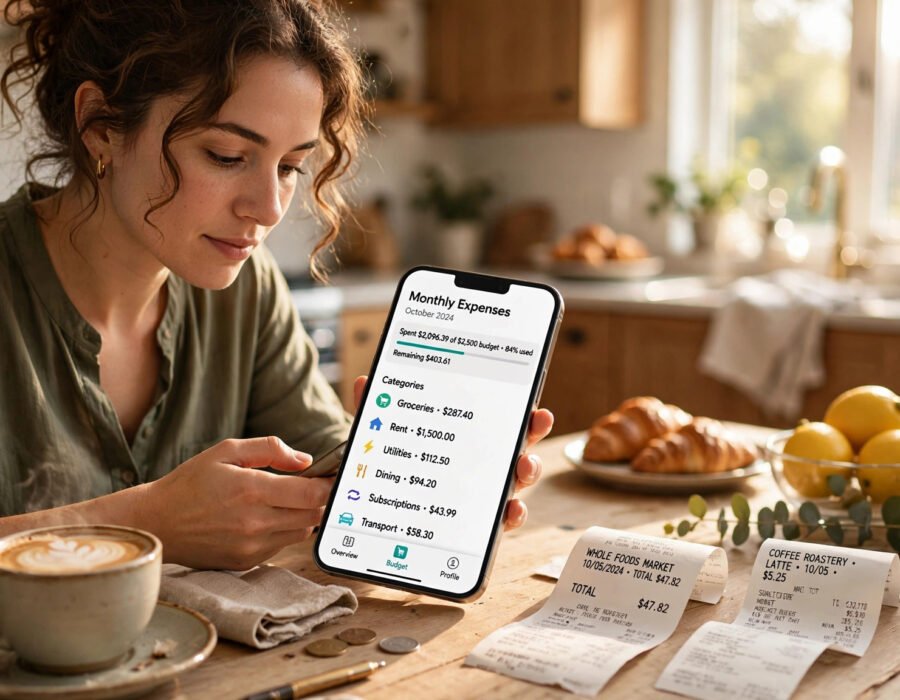
Most major US banks now auto-categorize transactions into groceries, dining, transport, and subscriptions the moment they post. Turn on spending summaries or “money tools” inside your banking app and you get a pie chart of your month with zero typing. It takes five minutes to enable and correct a few miscategorized purchases in the first week. After that, it’s maintenance-free.
2. One budgeting app (just one)
If you want more than your bank offers, pick a single app that links your accounts and assigns categories automatically. The trick is picking one and ignoring the rest — app-hopping is the number-two killer of tracking systems. Spend ten minutes on setup: link checking and credit cards, set your pay cycle, and let a month of data accumulate before judging it.
3. A weekly 10-minute money date
Technology collects the data; your judgment makes it useful. Once a week — Sunday evening works for most people — review the last seven days of spending, flag anything surprising, and check your subscriptions. The FDIC’s Money Smart program teaches exactly this rhythm: frequent small check-ins beat one heroic monthly session every time.
For a broader look at cutting everyday costs once you see where the money goes, our guide on how to save money on everyday expenses pairs naturally with this system.
A 10-Minute Weekly System That Actually Sticks
Here’s the exact routine, timed:
Minutes 0–2: Scan the week’s transactions
Open your app and scroll the last seven days. You’re looking for surprises — the $47 subscription you forgot, the double charge at the gas station, the third takeout order this week. Don’t judge, just notice.
Minutes 2–6: Check the three big buckets
Compare food, transport, and subscriptions against your targets. Most overspending hides in these three. If dining out is 40% over your plan, you don’t need a lecture — you need a decision, like a two-weeks-no-delivery rule.
Minutes 6–10: Look ahead, not back
Glance at the next seven days: what’s autopaying, what’s due, and does your checking balance cover it? This forward look is what separates trackers from worriers. People who use AI tools to budget monthly expenses often automate exactly this forward scan, but your eyes work fine.
How Long Until You See Real Patterns?
Be honest with yourself about the timeline:
- Week 1: You feel busier, not smarter. Normal. The data is still thin.
- Week 4: Your first full month snapshot. This is the payoff moment — most people find one subscription to kill and one habit to trim, usually worth $50–$150 a month.
- Week 12: Seasonal patterns emerge. You’ll see that your “normal” grocery spend is 20% higher in summer, or that November travel silently doubles your transport costs. Three months of data beats a year of guessing.
The biggest mistake beginners make is expecting insight on day one. Tracking is a camera, not a crystal ball — it needs a few rolls of film before the picture develops.
What to Track (and What to Ignore)
No-spreadsheet tracking works best when you’re selective. Track totals by category, not individual items. Knowing you spent $612 on groceries matters; knowing which Tuesday you bought the expensive cheese doesn’t.
Track: housing, food (split groceries vs. dining), transport, subscriptions, debt payments, and one “fun money” bucket. Ignore: micro-categorization (you don’t need “coffee” separate from “dining”), exact pennies, and anything you can’t act on. The goal is decisions, not archives.
One more rule: never track in more than one place. If your bank categorizes and your app categorizes, pick one source of truth. Double systems die fast.
Conclusion
So, how long does it take to track your spending without using a spreadsheet in 2026? About fifteen minutes to set up, two minutes a day to maintain, and ten minutes a week to actually learn something from it. The tools in your pocket already do the heavy lifting — your only job is showing up for the weekly review. Give it one full month, kill the subscriptions and habits the data exposes, and you’ll likely find the money you were “missing” was hiding in plain sight the whole time.
Frequently Asked Questions
Can I really track spending accurately without a spreadsheet?
Yes. Bank auto-categorization and budgeting apps pull the same transaction data a spreadsheet would hold, and they update automatically. Accuracy depends on correcting miscategorized items in the first week — after that, category totals are as reliable as any manual workbook.
How long does the initial setup take?
Plan for 15 minutes: about 5 to enable your bank’s spending tools or download an app, and 5–10 to link accounts and fix the first batch of categories. Most people can finish during one coffee break.
Do I need to check my spending every day?
A 90-second daily glance catches fraud and double charges fast, but it’s optional. The non-negotiable piece is the weekly 10-minute review — that’s where the actual savings come from.
What if my bank’s categories are wrong?
Recategorize them once and most apps learn your corrections. Spending ten minutes on corrections in week one prevents months of messy data. After the learning period, accuracy is typically above 90%.
Is a no-spreadsheet system enough for tax season?
For personal budgeting, yes. If you’re self-employed or itemizing deductions, you’ll still want exportable records — most apps export clean CSVs for your accountant. The CFPB’s consumer resources offer free worksheets if you need a paper backup.